TOOLS
Bloombox Canvas
A successful evidence-based tech project requires iteration as well as science and design working in tandem, while still keeping a clear view of the goals and desired outcomes. The Bloombox Canvas keeps all of that on a single page. It helps your team connect your target audience, outcomes, psychological mechanisms, and design decisions so that science and product stay in sync.
You’ll come back to the canvas many times. As you run studies, talk to users, or ship new features, your understanding will shift. The canvas is meant to be a living map of your project, not a one‑off document, especially when designers, researchers, clinicians, and product teams are working together.
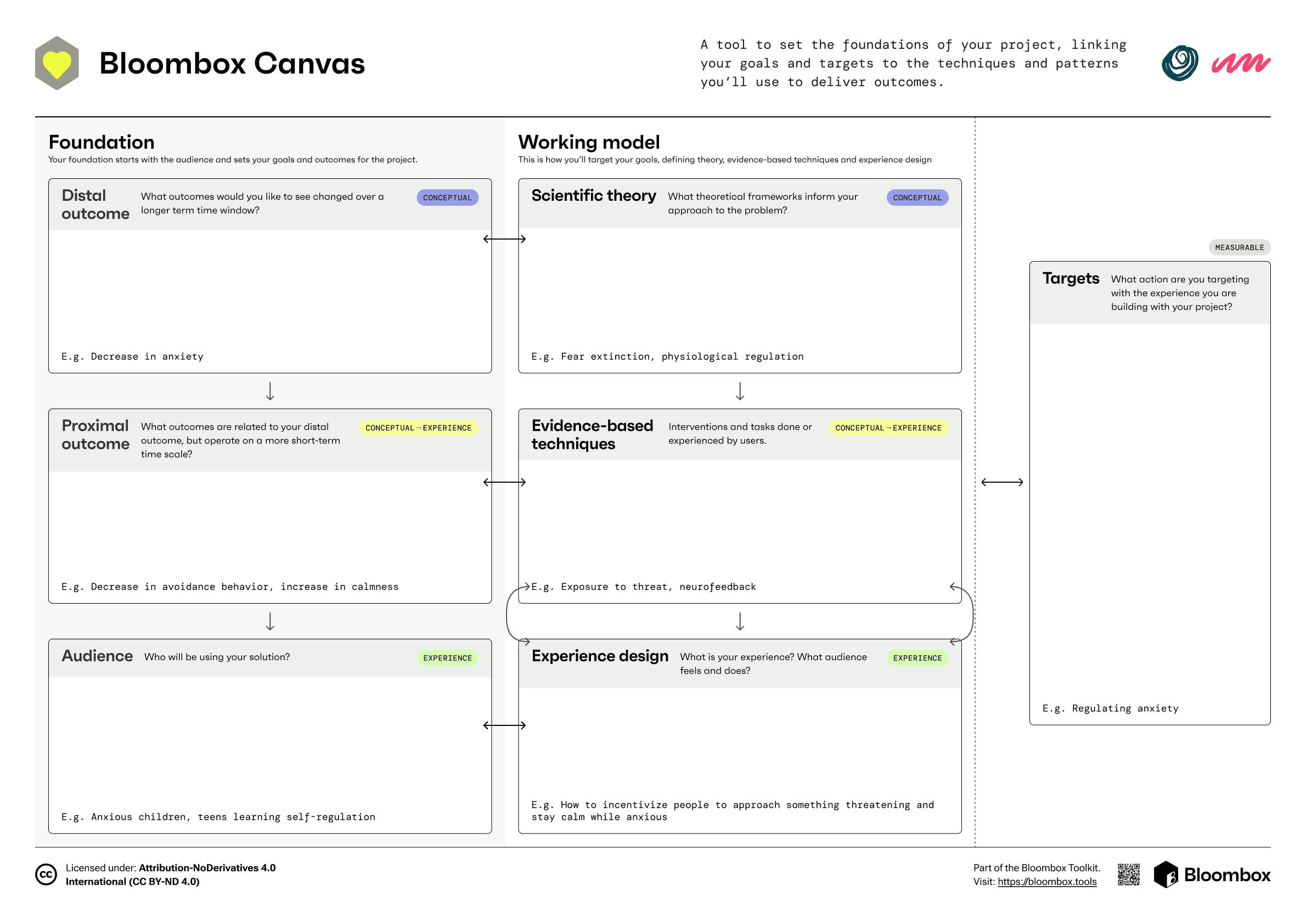
Downloadable canvas
The Canvas can be used on paper.
Miro template
Get Canvas in Miro.
Steps
01
Get your team a canvas
Download or duplicate the Bloombox Canvas so everyone is looking at the same thing. Print it out for an in‑person workshop, or open the shared Canvas PDF / Miro template to work online.
02
Sit together and do a first pass
Bring your team into the same room or call and start filling in the sections of the canvas. Use the guided journeys and step‑by‑step paths further down this page. It’s normal for big parts of the canvas to stay blank or fuzzy on the first round, especially for early stage projects.
03
Pause when you hit gaps
As you work, you’ll notice places where you’re missing information: evidence for a mechanism, clarity on your users, or agreement on outcomes. When that happens, capture the questions, then step away from the canvas to gather what you need: user interviews, literature, analytics, or small experiments.
04
Test, iterate, make it visible
When you’ve completed the canvas, put it canvas somewhere your whole team will see it often: on a wall or pinned in your digital workspace. Test what’s on the canvas in the real world, then revisit it after each experiment or major decision, updating outcomes, techniques, and targets. Over time, a series of dated canvas versions will tell the story of how your project evolved.
A simple start: choose your starting path
Pick where to begin based on what you already have.
Your choice only decides which part of the Canvas you fill first, you’ll still work through all of the steps below as your project evolves.
Conceptual
Outcome path
Start from the change you want to see.
Start by defining your near‑ and long‑term outcomes, then use the steps below to choose mechanisms, techniques, targets, and patterns that can deliver and measure that change.
conceptual
→
experience
Translation path
Start from existing evidence.
Use this if you already have proven techniques, programmes, or research findings you want to turn into a product or service.
Experience
Design path
Start from the current or desired experience.
Use this if you have a product, prototype, or its concept. Start by mapping the experience, then layer on mechanisms, techniques, and outcomes to strengthen it with science.
Not sure where to start? Help me choose
in use
Filling in the canvas
step‑by‑step guidance
Outcome
Translation
Design
You’re starting with the change you want to see. Work through steps below in the order that fits your chosen path. You don’t have to complete them all at once.
Canvas steps: the 7 building blocks
See as a
Scientist
Designer
Download zip
1
Audience
Identify audience and context
2
Proximal outcome
3
Distal outcome
4
Scientific theory
5
Technique
6
Experience design
7
Target
Prioritise the people whose change you’ll measure
Don’t try to solve everything for everyone. To measure real change, you need to be specific about who you are serving first.
Describe your primary user in 2–3 lines. Don’t just list demographics, think about other characteristics that define them.
Add context of use. Where are they? What device are they using? What are the constraints? Who else influences this experience? (Caregivers, bosses, teachers).
Interviews, surveys, empathy maps, and personas are recommended tools for this step.
Examples
A freelance creative (25–35) feeling isolated and burning out
Working from a chaotic home office on a laptop, with low motivation and high distraction.
You’re ready to move on when
You have moved beyond "everyone" to a specific primary user.
You can describe the context (time, place, device) clearly.
You have noted any critical constraints or risks.
Outcome tip
Highlight the audience segment you’ll measure outcomes on first.
Resources to help you define audience

Empathy Map
Align on what users think, feel, say, and do.

Persona
Create lightweight archetypes to design and test against.

Interviews
Get rich, first‑hand stories to ground your assumptions.

Surveys
Collect quick signals at scale to validate patterns.
in use
See how other teams used the canvas

Mindlight
An immersive game world through which children learn to manage and overcome anxiety symptoms

Deep
An immersive game world through which children learn to manage and overcome anxiety symptoms

Wisper
An immersive game world through which children learn to manage and overcome anxiety symptoms
View all case studies